> ## Documentation Index
> Fetch the complete documentation index at: https://docs.aeoral.com/llms.txt
> Use this file to discover all available pages before exploring further.
# Package Audit Logging & Edit Tracking
> How to use the new edit history and sync log features to track package modifications.
# Package Audit Logging
In **v1.1.9**, we introduced a comprehensive Audit Logging system to explicitly track changes made to packages. This is particularly crucial for identifying edits made *after* a package has already been synchronized with a courier API.
 ## Overview
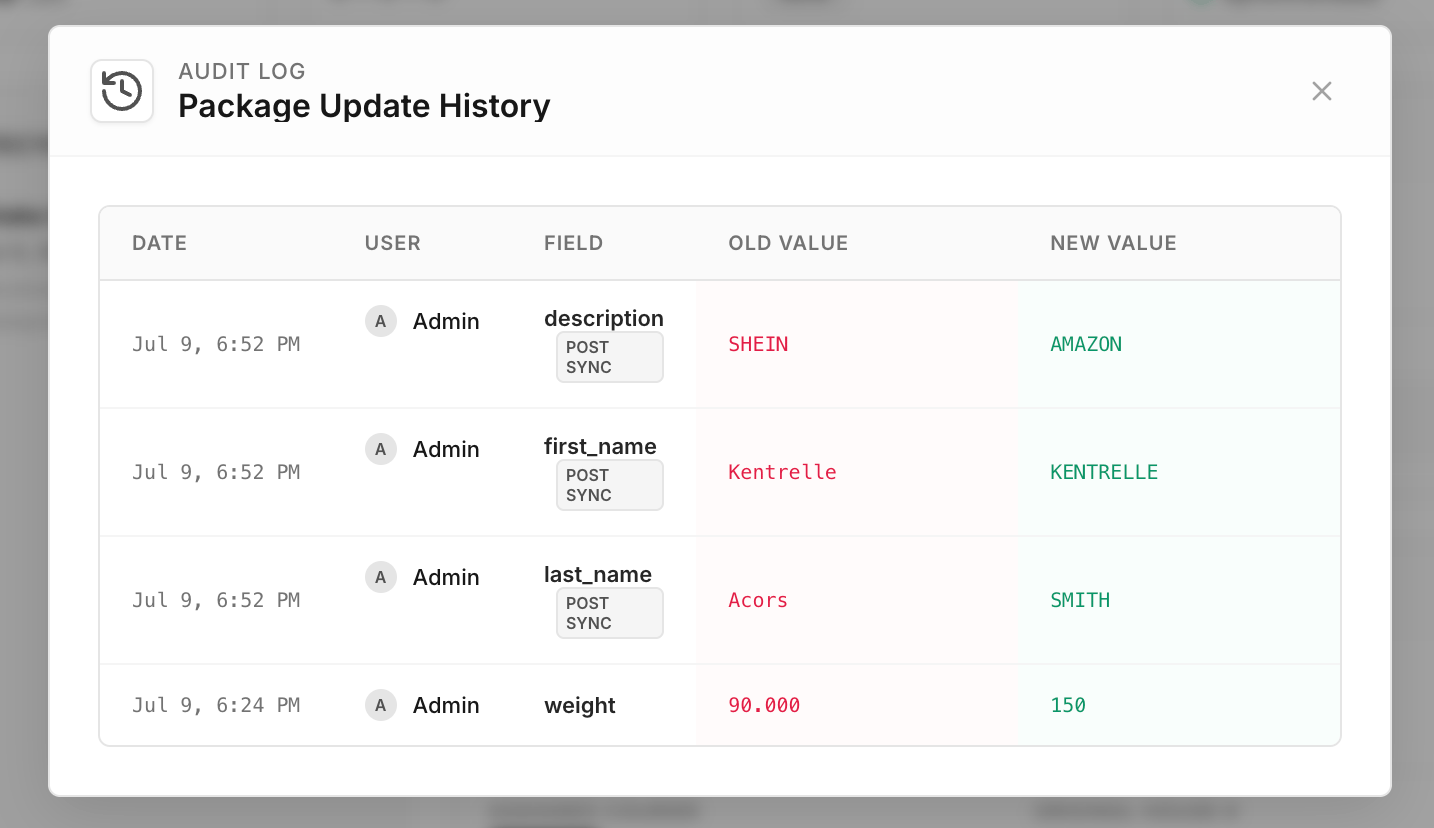
Whenever a critical field on a package is modified (e.g., Weight, Shipper, Customer Info, Tracking Number), the system records an immutable audit log.
This log captures:
* **Date and Time** of the change.
* The **User** who made the change.
* The specific **Field** that was altered.
* The **Old Value** and the **New Value**.
## Overview
Whenever a critical field on a package is modified (e.g., Weight, Shipper, Customer Info, Tracking Number), the system records an immutable audit log.
This log captures:
* **Date and Time** of the change.
* The **User** who made the change.
* The specific **Field** that was altered.
* The **Old Value** and the **New Value**.
 ### Sync State Preservation
Previously, updating a package would forcefully reset its `is_synced` status to `0` (Pending Sync). With the new audit logging system, **package edits no longer strip the synchronized status**. The package remains `is_synced = 1`, but any modifications are accurately recorded and flagged.
## Viewing the Edit History
1. Navigate to the **Packages** or **Claims** page.
2. Locate a package in the list.
3. If the package has been edited since its last sync, a **"Post Sync" (PS)** indicator or a **File Edit icon** will appear next to its sync status.
4. Click this icon, or open the **Package Details** modal and click the **Updates** button in the top right.
5. A clean, tabular view will display the complete timeline of changes.
## Sync Logs Revamp
In addition to edit tracking, the **Sync Logs** (found at the bottom of the Package Details modal) have been completely redesigned for easier debugging:
* **Side-by-Side View**: Clicking the **Details** button on a sync log entry now expands a full-width JSON viewer.
* **Request & Response**: You can now view the exact Request Payload sent to the courier alongside the raw Response Body returned by the courier API, formatted with proper syntax highlighting.
### Sync State Preservation
Previously, updating a package would forcefully reset its `is_synced` status to `0` (Pending Sync). With the new audit logging system, **package edits no longer strip the synchronized status**. The package remains `is_synced = 1`, but any modifications are accurately recorded and flagged.
## Viewing the Edit History
1. Navigate to the **Packages** or **Claims** page.
2. Locate a package in the list.
3. If the package has been edited since its last sync, a **"Post Sync" (PS)** indicator or a **File Edit icon** will appear next to its sync status.
4. Click this icon, or open the **Package Details** modal and click the **Updates** button in the top right.
5. A clean, tabular view will display the complete timeline of changes.
## Sync Logs Revamp
In addition to edit tracking, the **Sync Logs** (found at the bottom of the Package Details modal) have been completely redesigned for easier debugging:
* **Side-by-Side View**: Clicking the **Details** button on a sync log entry now expands a full-width JSON viewer.
* **Request & Response**: You can now view the exact Request Payload sent to the courier alongside the raw Response Body returned by the courier API, formatted with proper syntax highlighting.