> ## Documentation Index
> Fetch the complete documentation index at: https://docs.aeoral.com/llms.txt
> Use this file to discover all available pages before exploring further.
# Unknown Packages & Claiming Process
> Learn how Shiipp handles unknown packages and the streamlined claim process for both couriers and warehouse staff.
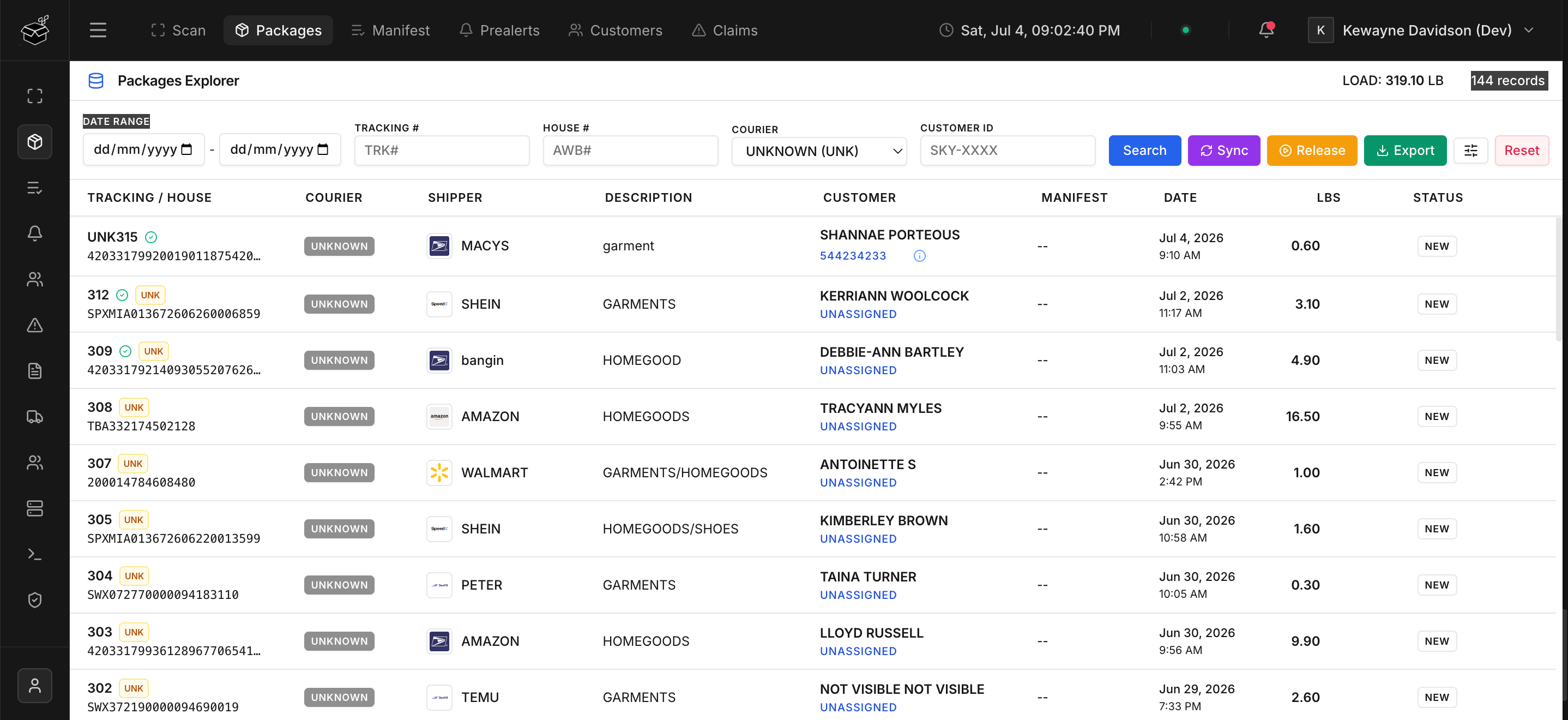
When a package is shipped by a customer who forgets to include their mailbox number or User Code on the shipping label, Shiipp cannot automatically match the tracking number to their account. When the package is scanned at the warehouse, the **User Code** field stays blank, and the package is flagged as **unknown**.
These packages are saved to the system but cannot be assigned to a manifest until they are linked to a customer. They appear in the main **Packages** list, clearly flagged with an badge.
## The Unknown Package Claiming Process
To efficiently resolve unknown packages and get them ready for manifesting, Shiipp features a robust, multi-role claiming workflow.
 ### 1. Courier Self-Service Claims
Couriers can browse a list of unknown packages in their dashboard. If they recognize a package that belongs to one of their customers, they can click the button to submit a claim.
To prevent unauthorized claims, the courier **must verify ownership**. They can do this in two ways:
* **Security Check**: Providing the last 6 digits of the tracking number.
* **Proof of Purchase**: Uploading an invoice or receipt (PDF or Image) showing the order details.
### 2. Streamlined Warehouse Claims
Often, a courier might contact the warehouse directly to claim a package. To speed up this process, warehouse staff can claim unknown packages on behalf of a courier directly from the system.
Because warehouse staff are trusted users, they **bypass the verification requirement**. They simply input the customer's name, select the correct courier from the dropdown, and submit the claim without needing to verify tracking digits or upload invoices.
### 3. Verification Workflow & Background Notifications
Once a claim is submitted, it enters a `Pending` state, and warehouse administrators can approve or reject the claim.
Throughout this process, Shiipp utilizes an asynchronous background queue to send notifications, keeping the user interface lightning fast:
* **Rich Email Notifications:** Sleek, modern HTML emails are automatically dispatched to the courier.
* **Pending Confirmation:** Sent immediately upon claim submission.
* **Final Decision:** A detailed **Approved** or **Rejected** notification is sent once the warehouse acts on the claim. If rejected, it includes specific warehouse notes explaining why.
Once a claim is approved, the package is immediately linked to the customer and becomes eligible for manifesting.
Prealerts pre-fill customer info automatically. Encourage your courier partners to submit prealerts before packages ship — it cuts intake time significantly and prevents packages from ever being flagged as unknown.
### 1. Courier Self-Service Claims
Couriers can browse a list of unknown packages in their dashboard. If they recognize a package that belongs to one of their customers, they can click the button to submit a claim.
To prevent unauthorized claims, the courier **must verify ownership**. They can do this in two ways:
* **Security Check**: Providing the last 6 digits of the tracking number.
* **Proof of Purchase**: Uploading an invoice or receipt (PDF or Image) showing the order details.
### 2. Streamlined Warehouse Claims
Often, a courier might contact the warehouse directly to claim a package. To speed up this process, warehouse staff can claim unknown packages on behalf of a courier directly from the system.
Because warehouse staff are trusted users, they **bypass the verification requirement**. They simply input the customer's name, select the correct courier from the dropdown, and submit the claim without needing to verify tracking digits or upload invoices.
### 3. Verification Workflow & Background Notifications
Once a claim is submitted, it enters a `Pending` state, and warehouse administrators can approve or reject the claim.
Throughout this process, Shiipp utilizes an asynchronous background queue to send notifications, keeping the user interface lightning fast:
* **Rich Email Notifications:** Sleek, modern HTML emails are automatically dispatched to the courier.
* **Pending Confirmation:** Sent immediately upon claim submission.
* **Final Decision:** A detailed **Approved** or **Rejected** notification is sent once the warehouse acts on the claim. If rejected, it includes specific warehouse notes explaining why.
Once a claim is approved, the package is immediately linked to the customer and becomes eligible for manifesting.
Prealerts pre-fill customer info automatically. Encourage your courier partners to submit prealerts before packages ship — it cuts intake time significantly and prevents packages from ever being flagged as unknown.